How to Detect Deepfake Videos: A Complete Guide for Social Media Users
Learn how to detect deepfake videos on social media by checking faces, lip-sync, voices, lighting, motion, source history, and context. This guide explains practical ways to investigate suspicious videos without relying on a single AI detection tool.
How to Detect Deepfake Videos: A Complete Guide for Social Media Users
A person appears on your feed and says something shocking.
The face looks familiar. The voice sounds right. The video quality looks convincing.
But there's one problem: the person never actually said or did what the video shows.
This is the danger of deepfake videos.
Deepfakes use artificial intelligence and other digital manipulation techniques to make people appear to say or do things that never happened. They can involve face swaps, voice cloning, AI-generated speech, lip-sync manipulation, or combinations of authentic and synthetic footage.
For social media users, the challenge is becoming harder because modern deepfakes don't always have obvious glitches.
So how can you tell if a video is a deepfake?
The best approach is not to look for one magical "AI glitch." Instead, combine visual clues, audio clues, source verification, reverse searches, provenance information, and independent evidence.
This guide walks you through the process.
What Is a Deepfake Video?
A deepfake is a digitally manipulated or AI-generated video designed to make a person appear to say or do something that did not actually happen.
Common examples include:
- Face-swapped videos
- AI-generated versions of real people
- Voice-cloned videos
- AI-generated speech
- Lip-sync manipulation
- Face reenactment
- Synthetic interviews
- Fake celebrity endorsements
- Fabricated political statements
- Altered news footage
Some deepfakes are created for entertainment, parody, filmmaking, or education.
Others are created to deceive people.
That's why AI-generated does not automatically mean fake or harmful. The important question is whether the content is accurately represented and whether viewers are being misled.
Why Deepfakes Are Difficult to Spot
Early deepfakes often contained obvious problems.
Faces could look blurry. Skin textures looked unnatural. Mouth movements didn't match speech.
Modern generation and editing systems are considerably better.
That means you shouldn't assume:
"I don't see anything strange, so it must be real."
The absence of an obvious visual error doesn't prove authenticity.
In fact, experts increasingly recommend combining technical inspection with source and context verification rather than relying on a single visual characteristic.
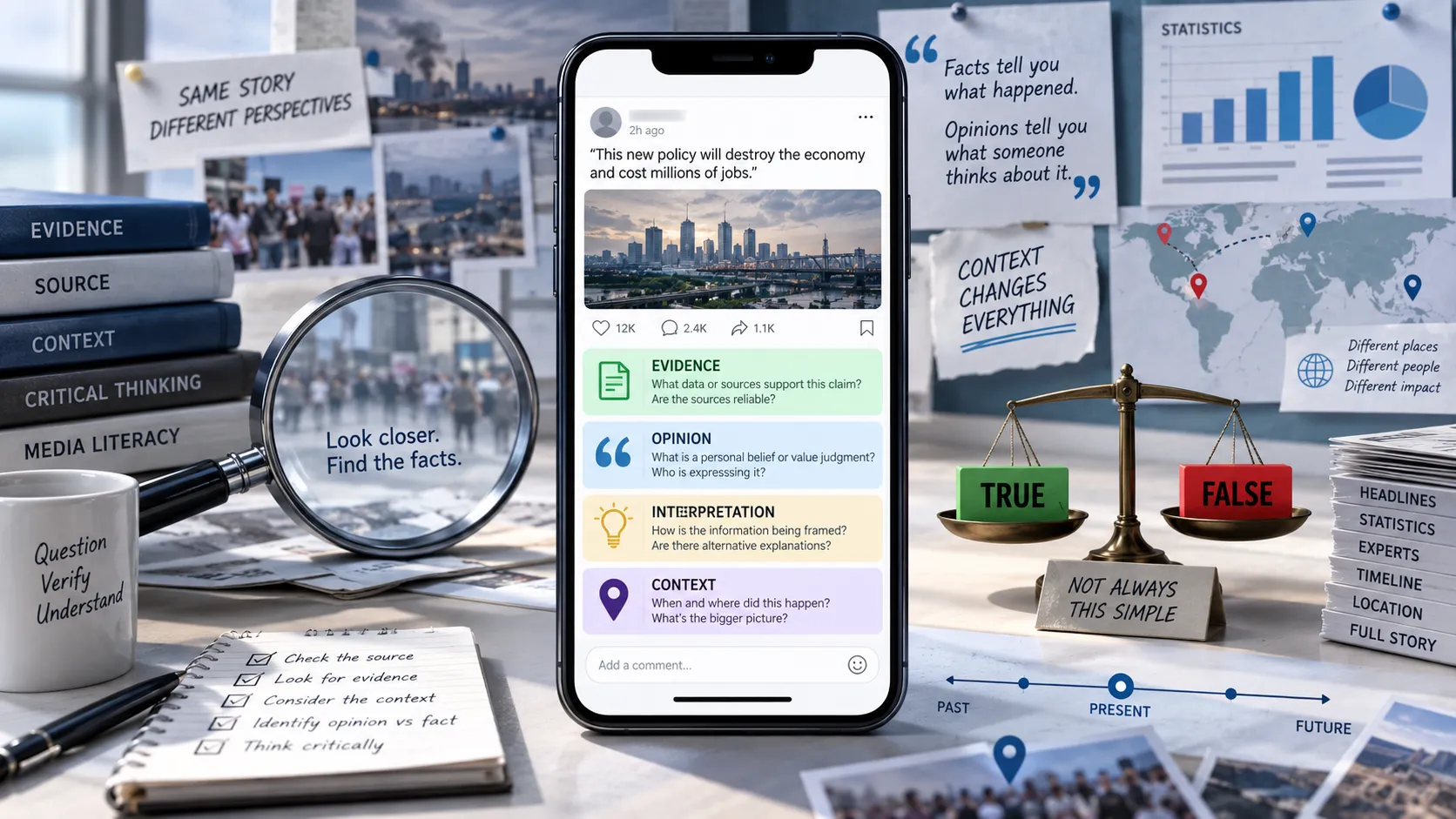
1. Start With the Source, Not the Video
Before zooming into someone's face, ask where the video came from.
Check:
- Who posted it?
- Is the account established?
- Is the account actually associated with the person shown?
- When was it first posted?
- Is it a repost?
- Is there an original upload?
- Does the account regularly post sensational content?
An anonymous account suddenly posting a supposedly exclusive video of a major public event deserves more scrutiny than an original upload from a well-established source.
This doesn't mean an anonymous account is automatically wrong.
It simply means you have less reason to trust the video without additional evidence.
2. Find the Earliest Available Version
Try to find where the video first appeared.
Search for:
- Distinctive phrases from the caption
- The person's name
- The event being discussed
- The original uploader
- Screenshots from the video
- Unique visual details
If you find an earlier version, compare it with the viral copy.
You may discover that:
- The viral version was cropped
- The audio was replaced
- A section was removed
- The face was altered
- The original context was different
- The video is much older than claimed
Finding an earlier version can sometimes be more useful than simply running an AI detector.
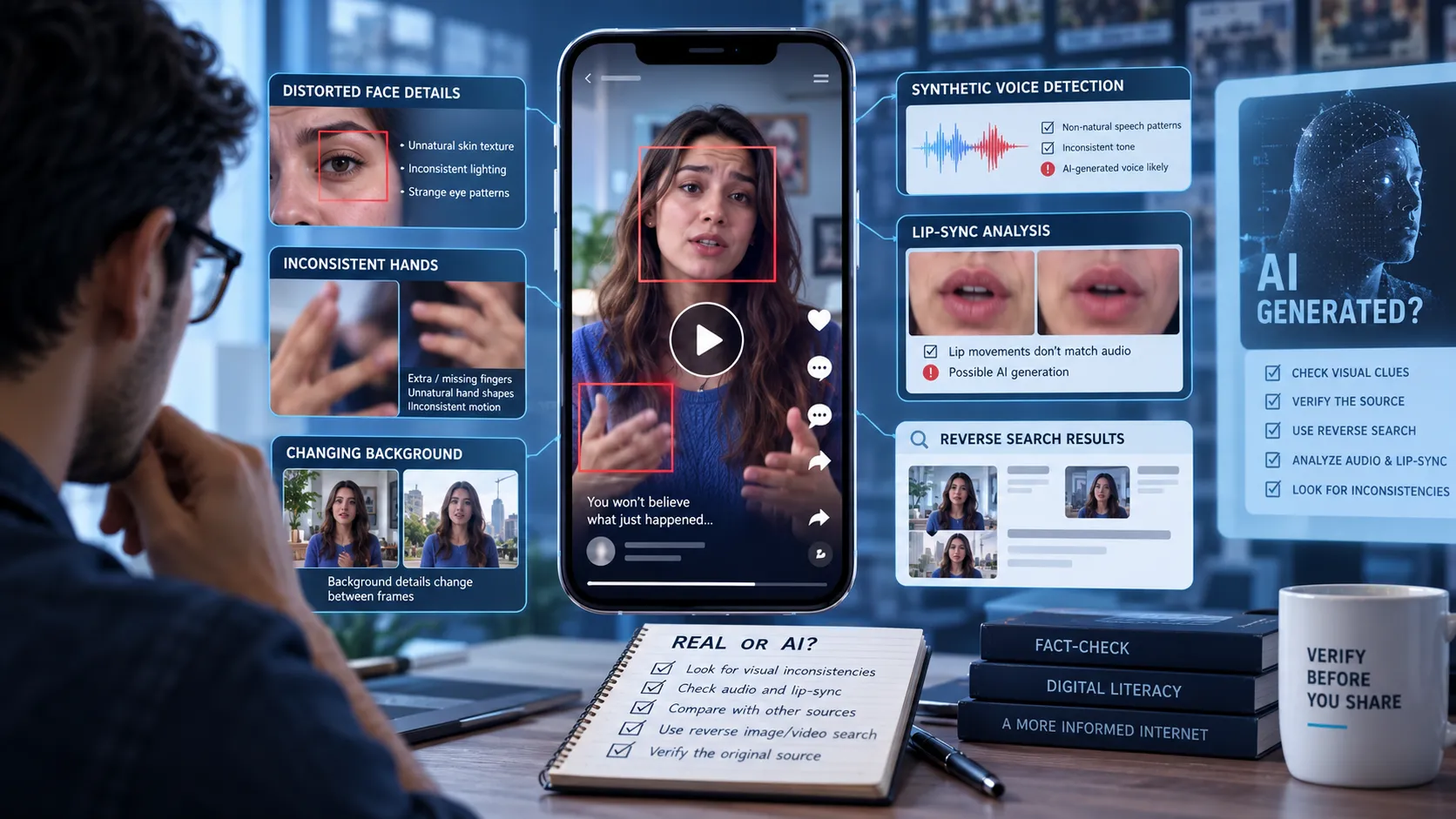
3. Examine the Face
Look closely at the person's face, particularly around the edges.
Check the:
- Jawline
- Hairline
- Ears
- Cheeks
- Eyes
- Teeth
- Skin texture
Potential warning signs include:
- Flickering around the face
- Facial features changing between frames
- Strange blending around the jaw
- Hair appearing to merge with the background
- Teeth changing shape
- Unnatural skin texture
- Facial details becoming blurry during movement
These signs have been identified as useful areas to inspect when investigating suspicious deepfake footage.
But remember: compression and poor-quality uploads can create similar artifacts.
4. Watch the Video Frame by Frame
A video can look convincing when played normally but reveal inconsistencies when slowed down.
Try watching suspicious sections at:
- 0.5× speed
- 0.25× speed
Look for sudden changes in:
- Face shape
- Hair
- Teeth
- Eyes
- Skin
- Clothing
- Background objects
Pay particular attention to moments when the person turns their head or moves quickly.
Deepfake manipulation can become more noticeable during transitions and complex movements.
5. Check the Eyes
Eyes can provide useful clues.
Look for:
- Unnatural blinking
- Inconsistent eye direction
- Strange reflections
- Different-looking pupils
- Flickering around the eyes
- Reflections that don't match the environment
Compare both eyes.
Does the lighting appear consistent?
Do reflections make physical sense?
Does the person's gaze behave naturally as they move?
Again, no single eye artifact proves a video is fake. Treat it as one piece of evidence.
6. Look at the Ears and Hair
Ears and hair can be particularly useful when examining face swaps.
Ask:
- Does the ear shape match the person?
- Does the hairline remain stable?
- Does hair appear to merge into the background?
- Does hair suddenly change texture?
- Does the area around the ears flicker?
These areas can be difficult to manipulate convincingly because they contain complex shapes and fine details.
7. Check Lip-Sync Carefully
One of the most useful checks is comparing speech with mouth movement.
Slow the video down and watch:
Do the lips form the sounds you're hearing?
Warning signs can include:
- Audio arriving slightly before or after the mouth movement
- Mouth shapes that don't match spoken sounds
- Teeth changing unexpectedly
- Lips moving strangely
- Facial muscles not matching the speech
- Speech continuing while the mouth barely moves
Lip-sync errors can be particularly useful when a real person's face has been manipulated to match cloned or fabricated speech.
8. Listen to the Voice
Deepfake detection isn't only visual.
Listen carefully to the speaker.
Possible warning signs include:
- Unnatural pauses
- Strange pronunciation
- Flat emotional delivery
- Unusual emphasis
- Robotic rhythm
- Missing or unnatural breathing
- Sudden changes in vocal tone
- Words blending together
However, high-quality AI voice cloning can sound extremely natural.
A convincing voice isn't proof that the person actually spoke those words.
9. Compare the Person's Mannerisms
People have characteristic ways of speaking and moving.
Watch for:
- Head movements
- Facial expressions
- Hand gestures
- Typical pauses
- Speech patterns
- Smiles
- Eyebrow movements
- Posture
Ask:
Does this behavior resemble the person's normal mannerisms?
This is sometimes called behavioral or "soft biometric" analysis. Familiar patterns of movement and expression can provide additional clues when comparing authentic footage with a suspected deepfake.
It isn't conclusive, but it can help.
10. Check Lighting and Shadows
Lighting should behave consistently across the scene.
Look for:
- Different lighting on the face and body
- Shadows pointing in contradictory directions
- Reflections that don't match the light source
- Facial highlights that suddenly change
- A face appearing brighter or darker than nearby objects
For example, if the entire scene is illuminated from the left, but the face appears to have strong lighting coming from the right, investigate further.
Real-world footage can also contain complicated lighting, so don't treat this alone as proof of manipulation.
11. Examine the Background
Deepfake manipulation can sometimes affect more than the face.
Watch the background for:
- Warping
- Flickering
- Objects changing shape
- Missing objects
- Strange edges
- Moving backgrounds that don't match camera movement
A background that subtly changes from one frame to another can be a useful warning sign.
12. Look for Audio and Video Inconsistencies
Don't analyze the video and audio separately.
Compare them.
For example:
Visual: The person appears to be speaking calmly.
Audio: The voice suddenly becomes emotional.
Or:
Visual: The person's mouth barely moves.
Audio: They appear to be delivering a long sentence.
These mismatches deserve further investigation.
13. Search for the Original Interview or Speech
If a deepfake shows a public figure saying something controversial, search for the original appearance.
Try searching for:
- The person's name
- The claimed quote
- The event
- The interview
- The date
- The location
For example, if a video claims that a celebrity announced a major product endorsement, search for the alleged announcement through the celebrity's official channels and reputable news sources.
You may discover that the original video contains completely different words.
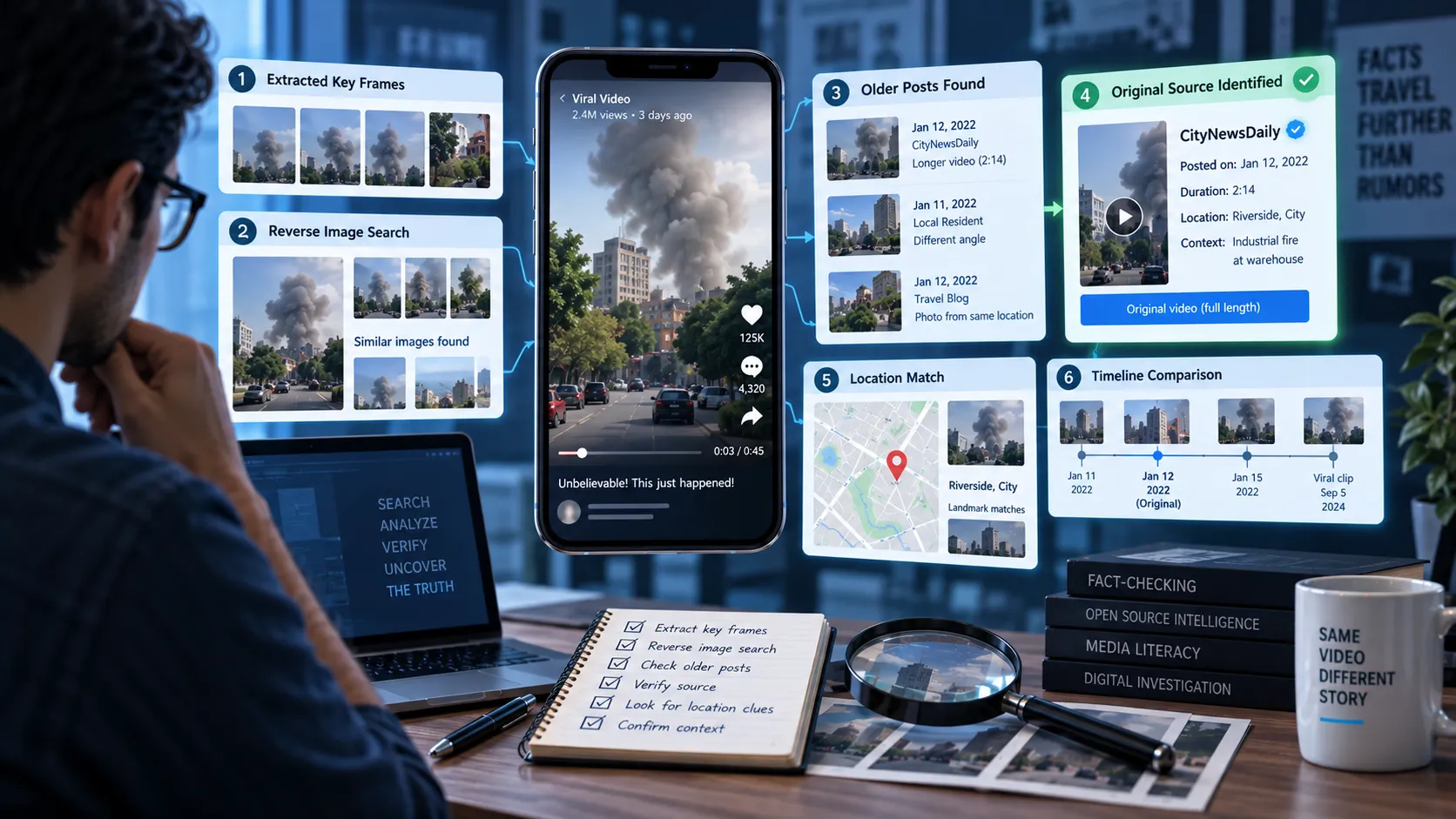
14. Use Reverse Image Search
You can't always perform a traditional reverse video search, but you can extract useful frames.
Take screenshots from several moments in the video.
Choose frames containing:
- The person's face
- Unique backgrounds
- Signs
- Buildings
- Products
- Logos
- Unusual objects
Search those frames using reverse image-search services.
You may find:
- The original video
- Older screenshots
- News articles
- Previous versions
- Fact-checking articles
- The original interview
Reverse searching keyframes is a useful part of a broader verification workflow.
15. Check the Video's Date
A common misinformation tactic isn't necessarily creating an entirely fake video.
Sometimes an authentic video is reused with a false date.
For example:
Original: A politician makes a statement in 2023.
Viral claim: The politician made the statement yesterday.
The video itself may be genuine, but the context is false.
Always compare the video's claimed date with the earliest version you can locate.
16. Check the Location
Does the location shown in the video match the claim?
Look for:
- Street signs
- Buildings
- Store names
- Road markings
- Weather
- Language
- Architecture
- Public transport
- Landmarks
If a video supposedly shows an event in one country but the visible signs, architecture, or landmarks point somewhere else, investigate further.
17. Look for Independent Confirmation
This is one of the strongest checks you can perform.
Suppose a video claims:
"Major earthquake hits the city."
Don't only investigate the video.
Search for independent evidence.
Check:
- Reputable news organizations
- Government agencies
- Emergency services
- Local journalists
- Eyewitness accounts
- Other independently recorded videos
If a supposedly major event happened, there will often be evidence outside the original social media post.
The lack of independent confirmation doesn't automatically prove a deepfake, but it should reduce your confidence in the claim.
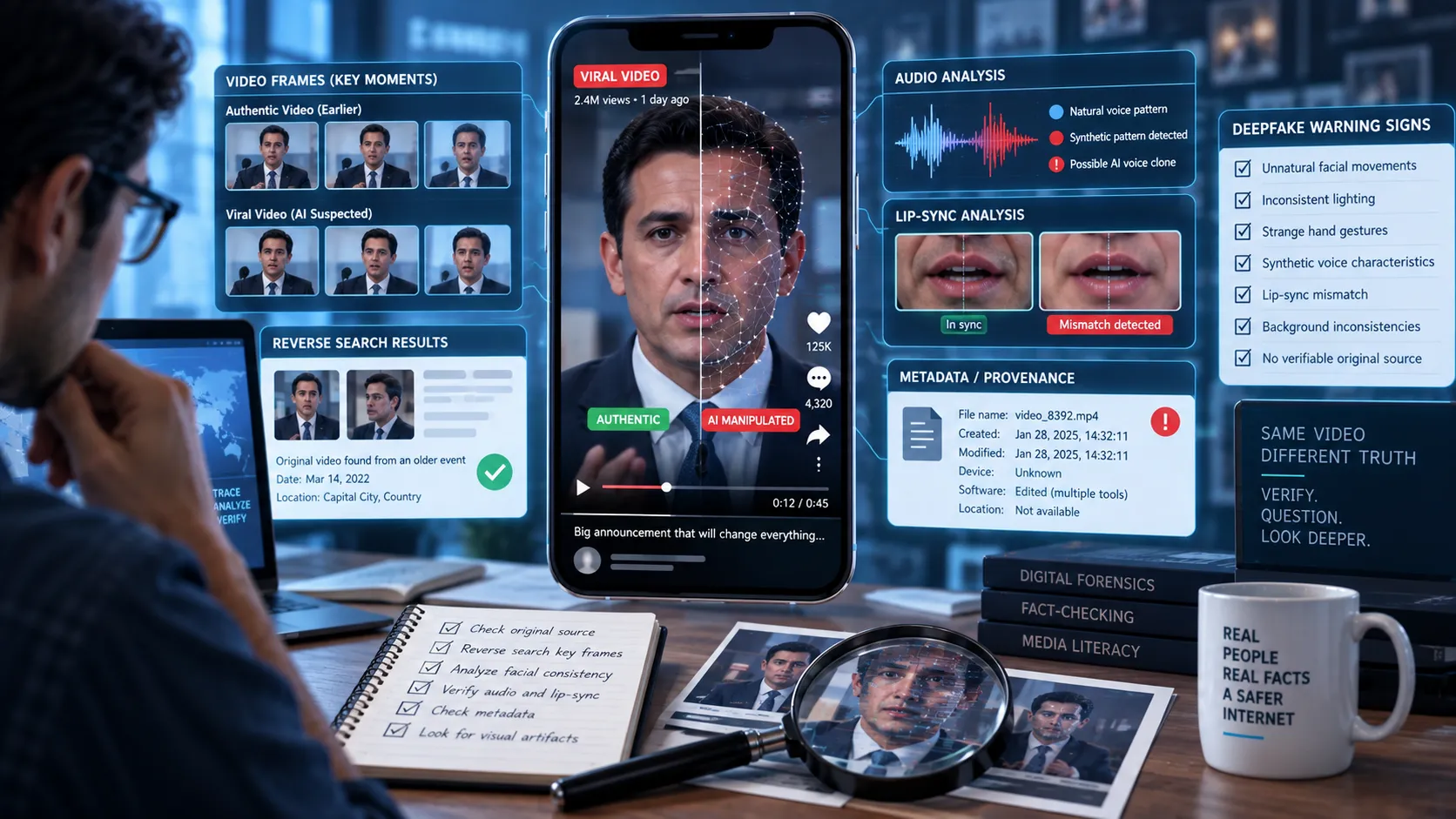
18. Check for Content Credentials
Another approach is to investigate the video's provenance.
Technologies such as C2PA Content Credentials are designed to record information about the origin and editing history of digital content in a tamper-evident way. They can potentially indicate how an asset was created or modified.
If available, provenance information may tell you:
- Where the content originated
- What software or device created it
- Whether edits were made
- When credentials were issued
- Which organization or system signed the information
However, Content Credentials are not a universal truth detector.
Their presence can provide useful provenance information, but their absence does not prove that a video is fake. Platforms may also strip metadata during processing or reposting.
19. Use Deepfake Detection Tools Carefully
Automated detection tools can analyze suspicious media for signs of manipulation.
They can be useful when human inspection isn't enough.
But don't make the mistake of treating a detector's percentage as absolute truth.
For example:
"Detector says 92% AI-generated."
That doesn't necessarily mean:
"There is a 92% certainty that the video is fake."
Detection systems can produce false positives and false negatives, and social-media processing such as compression, cropping, screen recording, and re-encoding can make forensic analysis harder.
Use automated detection as supporting evidence, not your only evidence.
20. Don't Trust a Video Because It Looks Real
This may be the most important rule.
Humans are naturally influenced by visual realism.
If someone looks exactly like a real celebrity and sounds exactly like them, our brains tend to assume that the video must be authentic.
But appearance is not proof.
Instead, separate these questions:
Does the person look real?
Does the voice sound real?
Did this person actually say these words?
Was this video recorded when the post claims?
Is the video being presented in its original context?
Those are different questions.
Deepfake Detection: A Practical 60-Second Test
When you're scrolling through social media and encounter a suspicious video, use this quick process.
First 10 seconds: Check the source
Who posted it?
Is there an original source?
Is the account credible?
Next 10 seconds: Watch the face
Check:
- Eyes
- Mouth
- Hair
- Ears
- Facial edges
Next 10 seconds: Listen
Does the voice sound natural?
Does the lip movement match?
Next 10 seconds: Slow it down
Watch suspicious sections at 0.25× or 0.5× speed.
Next 10 seconds: Search
Search a distinctive phrase or screenshot from the video.
Final 10 seconds: Verify the claim
Can an independent source confirm what the video claims?
If you still aren't sure, don't share it as fact.
Common Mistakes People Make When Detecting Deepfakes
Mistake 1: Looking for weird hands
Hands can sometimes reveal AI generation, but deepfake video isn't always about generating hands.
A sophisticated face swap could have perfectly normal hands.
Mistake 2: Trusting one AI detector
No detection tool is perfect.
Use multiple forms of evidence.
Mistake 3: Assuming no glitches means real
Modern deepfakes can be visually convincing.
The absence of obvious artifacts doesn't establish authenticity.
Mistake 4: Ignoring the source
A technically convincing video from an anonymous account still needs verification.
Mistake 5: Confusing old footage with fake footage
An authentic video can be misleading if it is presented as a recent event.
Mistake 6: Believing something because it confirms your views
This is one of the biggest dangers of misinformation.
If a video confirms something you already believe, you're more likely to accept it without checking.
Apply the same verification standard to content you agree with as content you disagree with.
What to Do If You Find a Suspected Deepfake
If you believe a video may be manipulated:
- Don't immediately share it.
- Save the original post or URL.
- Record the account that posted it.
- Take screenshots of important frames.
- Search for earlier versions.
- Search for the original source.
- Look for independent confirmation.
- Use detection tools if appropriate.
- Check available provenance information.
- Report deceptive content through the platform when appropriate.
If the video is being used to request money, passwords, financial information, or urgent action, verify the request through a separate trusted channel before doing anything.
Deepfake Detection Checklist
Use this checklist whenever you're unsure about a video:
- Who originally posted the video?
- Is there a longer or original version?
- Does the face remain consistent between frames?
- Do the eyes and reflections look natural?
- Do the ears and hair remain consistent?
- Does the mouth match the audio?
- Does the voice sound natural?
- Are facial expressions believable?
- Does the lighting make sense?
- Do shadows and reflections match?
- Does the background remain stable?
- Does the claimed date match the original upload?
- Does the location match the claim?
- Can independent sources confirm the event?
- Are Content Credentials available?
- Have you checked the video with appropriate detection tools?
- Are you relying on multiple pieces of evidence?
The more independent evidence you can establish, the more confident you can be.
How Somiq Can Help You Investigate Suspicious Videos
When a suspicious video appears on TikTok, Instagram, YouTube, or another social platform, the important question isn't simply:
"Is this a deepfake?"
A better question is:
"What evidence supports or contradicts what this video is claiming?"
Somiq is designed to help users investigate claims made in short-form videos and evaluate the evidence behind them.
That means looking beyond whether a video appears convincing.
For a suspicious video, you want to investigate:
- The claim
- The source
- The original context
- The publication timeline
- Supporting evidence
- Contradicting evidence
- Signs of manipulation
This is especially important because a video can be technically authentic but contextually misleading, or technically manipulated while being based on genuine footage.
Final Takeaway
Deepfakes are getting harder to identify by appearance alone.
There is no single trick that can reliably expose every fake video.
Instead, use a layered approach:
Check the source.
Inspect the video.
Listen to the audio.
Slow suspicious sections down.
Search for the original footage.
Check the date and context.
Look for independent confirmation.
Use detection tools as supporting evidence.
Check provenance information when available.
Most importantly, don't let a convincing face or familiar voice become your proof that something happened.
A video can look real and still tell a false story.
The safest habit on social media is simple:
Pause. Investigate. Verify. Then share.