How to Spot AI-Generated Videos on TikTok, Instagram, and YouTube
AI-generated videos are becoming harder to recognize on TikTok, Instagram, and YouTube. Learn how to spot AI video clues, including unnatural faces, voices, hands, motion, lighting, lip-syncing, and misleading captions, and discover how to verify suspicious videos.
How to Spot AI-Generated Videos on TikTok, Instagram, and YouTube
AI-generated video has become remarkably convincing.
A few years ago, obvious visual glitches often made synthetic videos easy to recognize. Today, generative AI can produce realistic people, voices, environments, animations, and even entire scenes that look authentic at first glance.
That creates a problem for anyone scrolling through TikTok, Instagram Reels, YouTube Shorts, or other social platforms.
A video can look completely real and still be artificially generated or heavily manipulated.
The good news is that there are still clues you can look for.
In this guide, you'll learn how to spot AI-generated videos, what warning signs to look for, how to investigate suspicious clips, and why you should avoid relying on a single visual clue.
What Is an AI-Generated Video?
An AI-generated video is video content created or substantially altered using artificial intelligence.
Depending on the technology, AI can generate:
- Entire video scenes from text prompts
- Artificial people and faces
- Synthetic voices
- Digital presenters
- Face swaps
- Lip-syncing
- Backgrounds and environments
- Animated photographs
- Altered or replaced objects
- Synthetic news footage
- AI-generated advertisements
Some videos are entirely synthetic, while others combine authentic footage with AI-generated elements.
This distinction matters because AI-assisted editing isn't automatically misinformation.
A creator might use AI to remove background noise or generate subtitles. Another person might use AI to fabricate a fake statement from a public figure.
The important question is not simply:
"Was AI used?"
It's:
"What was AI used to create or change, and does that change the meaning of the video?"
Why AI Videos Are Difficult to Identify
Modern AI-generated videos don't always contain obvious errors.
Older AI-generated content often had strange:
- Faces
- Teeth
- Fingers
- Eyes
- Hair
- Body movements
Newer systems can produce much more convincing results.
That means the old advice of simply looking for "weird hands" isn't enough.
Instead, look for multiple inconsistencies across the entire video.
A useful rule is:
One strange detail is a clue. Several independent inconsistencies are stronger evidence.
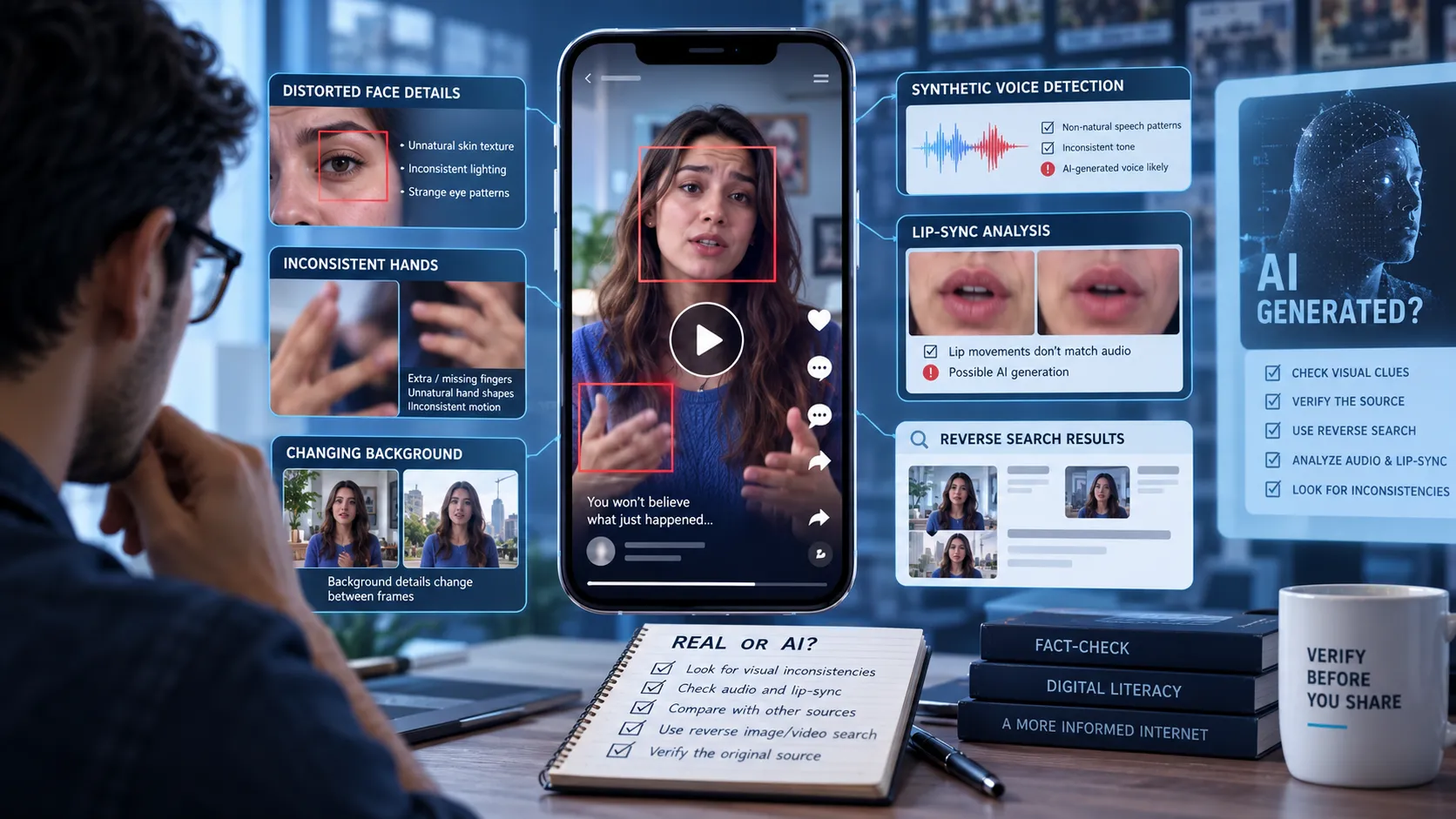
1. Look Closely at Faces
Faces are still one of the most useful areas to inspect.
Pause the video and examine:
- Eyes
- Teeth
- Ears
- Skin texture
- Hair
- Facial expressions
- Jewelry
- Glasses
- Facial proportions
AI-generated faces can sometimes contain subtle inconsistencies that become more obvious when the person moves.
For example, glasses may appear to change shape, earrings may disappear, or facial features may shift slightly between frames.
Don't assume every unusual face is AI-generated, though. Compression, filters, poor lighting, and aggressive beauty effects can also distort facial details.
2. Watch the Eyes
Eyes can provide useful clues.
Pay attention to:
- Unnatural blinking
- Eyes moving inconsistently
- Strange reflections
- Different-looking pupils
- Eye direction changing unexpectedly
- Reflections that don't match the environment
Human eyes naturally respond to lighting and movement.
In synthetic footage, reflections or eye movement can occasionally behave inconsistently.
However, this is only one clue. A strange-looking eye does not prove that a video was generated by AI.
3. Examine Hands and Fingers
Hands have historically been challenging for generative models.
Look for:
- Incorrect finger counts
- Fingers merging together
- Strange joints
- Fingers changing shape
- Objects passing through hands
- Jewelry changing between frames
- Hands becoming distorted during movement
This clue is becoming less reliable as AI improves, but severe hand inconsistencies can still be useful evidence.
4. Watch Objects as They Move
Don't only inspect individual frames.
Watch how objects behave from one frame to the next.
Look for things that:
- Change shape
- Appear and disappear
- Merge into other objects
- Move without a clear physical cause
- Change texture
- Warp during movement
For example, a logo on a shirt might look correct in one frame and subtly change in another.
A person's necklace could also change position or design while the camera remains relatively stable.
These temporal inconsistencies can be more revealing than a single strange frame.
5. Pay Attention to Background Details
AI generation can struggle with complex environments.
Inspect:
- Signs
- Buildings
- Cars
- Street markings
- Windows
- Furniture
- Posters
- Text
- Reflections
- Crowds
Ask yourself whether the background remains consistent throughout the video.
A building might subtly change shape. A sign might contain almost-readable text. A vehicle's design could shift between frames.
These inconsistencies don't automatically prove AI generation, but they deserve investigation.
6. Check Text Inside the Video
AI-generated imagery has historically struggled with producing consistent written text.
Look closely at:
- Store signs
- Newspaper headlines
- Product labels
- License plates
- Posters
- Screens
- Street signs
Watch whether letters remain stable as the camera moves.
You might see text that looks almost correct but contains:
- Random characters
- Misspelled words
- Distorted letters
- Changing words
- Inconsistent fonts
This is one of the easiest clues to check because real-world text usually remains consistent.
7. Listen to the Voice
AI-generated video isn't only about visuals.
Synthetic voices can sometimes provide clues.
Listen for:
- Unnatural pauses
- Strange pronunciation
- Inconsistent emphasis
- Robotic rhythm
- Unusual breathing
- Emotion that doesn't match the words
- Words blending together
- Abrupt changes in tone
Some AI voices are extremely convincing, so audio analysis alone should not be treated as proof.
Background audio can also be artificially generated or manipulated.
8. Check Lip-Syncing
If someone appears to be speaking, watch their mouth carefully.
Ask:
Do the mouth movements match the sounds?
Potential warning signs include:
- Lips moving slightly before or after speech
- Mouth shapes that don't match certain sounds
- Teeth changing appearance
- Facial muscles behaving strangely
- Speech continuing while the mouth barely moves
High-quality synthetic lip-syncing can be difficult to distinguish from authentic footage, so again, use this as part of a larger investigation.
9. Look for Unnatural Motion
Real-world physics create consistent movement.
AI-generated footage can sometimes struggle with:
- Walking
- Running
- Turning
- Dancing
- Falling
- Throwing objects
- Driving
- Physical interactions
Pay particular attention when multiple objects interact.
For example, a person's hand may appear to pass through another object, or their body may subtly change shape during a rapid movement.
Slow the video down if necessary.
Some inconsistencies become much easier to notice at half speed.
10. Check Lighting and Shadows
Lighting should make physical sense.
Look for:
- Shadows pointing in inconsistent directions
- Reflections that don't match the light source
- Faces illuminated differently from nearby objects
- Objects with missing shadows
- Highlights appearing in impossible locations
For example, if sunlight clearly comes from the left side of the scene, objects generally shouldn't have shadows suggesting that the light comes from the right.
Lighting inconsistencies can occur in real footage too, particularly with artificial lighting, so they should be treated as clues rather than definitive proof.
11. Look for Inconsistent Reflections
Reflections are particularly useful because they have to correspond to the physical environment.
Check:
- Mirrors
- Windows
- Sunglasses
- Car surfaces
- Water
- Polished objects
Ask whether the reflected environment matches what the camera should actually see.
An AI-generated reflection might contain a slightly different person, object, or background.
12. Check the Video's Context
Sometimes the strongest clue isn't inside the video.
It's the story surrounding it.
Ask:
- Who uploaded it?
- When was it uploaded?
- What does the caption claim?
- Where supposedly did it happen?
- Is there a credible source?
- Are reputable outlets reporting the event?
- Does the claimed location exist?
- Does the account regularly post AI-generated content?
For example, a video claiming to show a major breaking event should normally leave some trace outside a single social media account.
If an extraordinary event supposedly happened but there is no credible independent evidence, that's a reason to investigate further.
13. Investigate the Account That Posted It
Look at the uploader's profile.
Check:
- Previous posts
- Account creation date
- Bio
- Disclosure of AI use
- Other synthetic videos
- Sudden changes in content
- Engagement patterns
Some creators clearly label AI-generated content.
Others don't.
An account that repeatedly posts obviously synthetic videos may provide useful context for evaluating a suspicious clip.
But don't assume that an account's history proves that every video it posts is AI-generated.
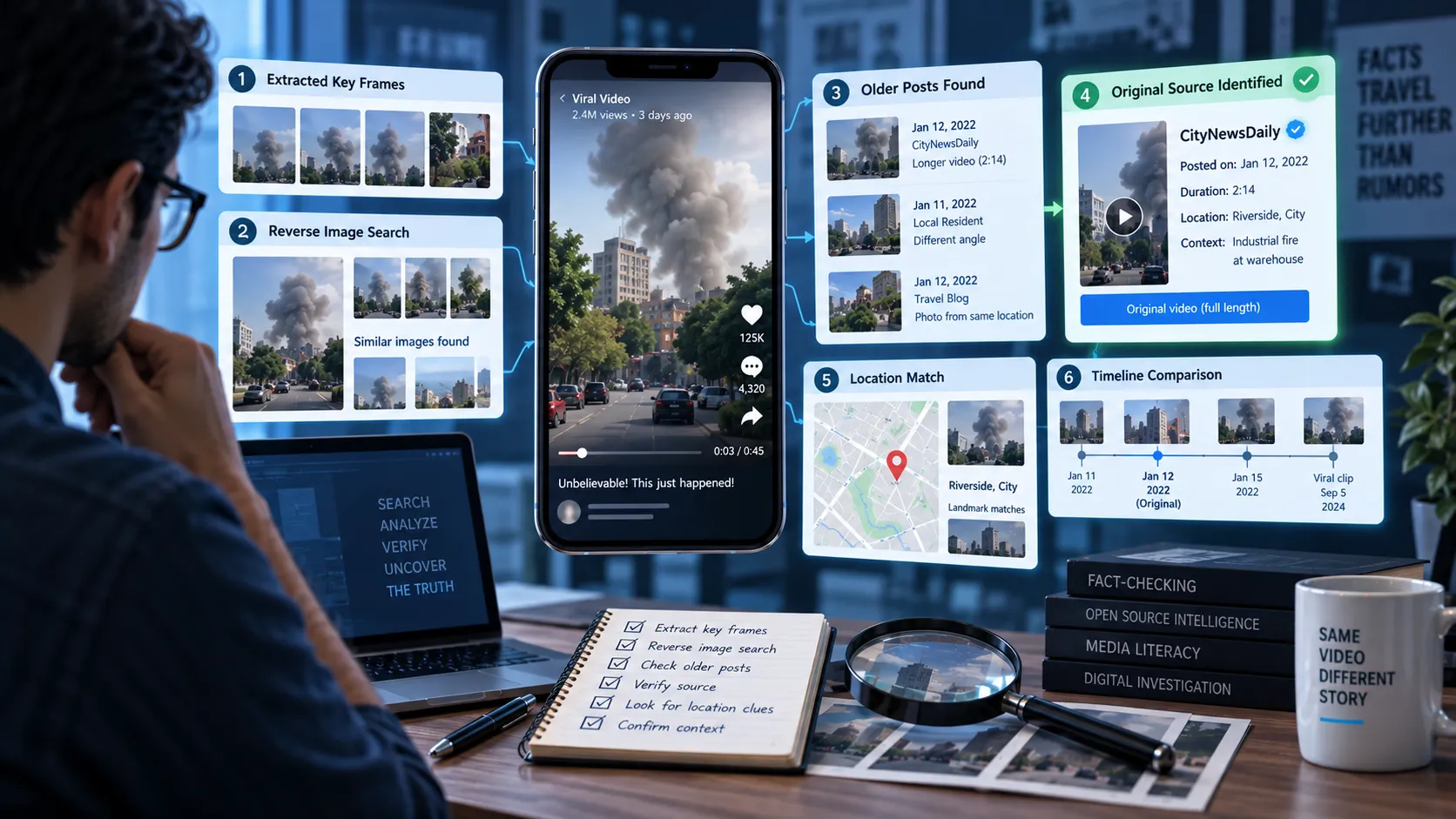
14. Search for the Same Video Elsewhere
If you suspect that a video is manipulated, search for other versions.
Try:
- Reverse image searches
- Screenshots from key frames
- Distinctive phrases
- The video's title
- Captions
- Creator usernames
You may discover an original version of the footage.
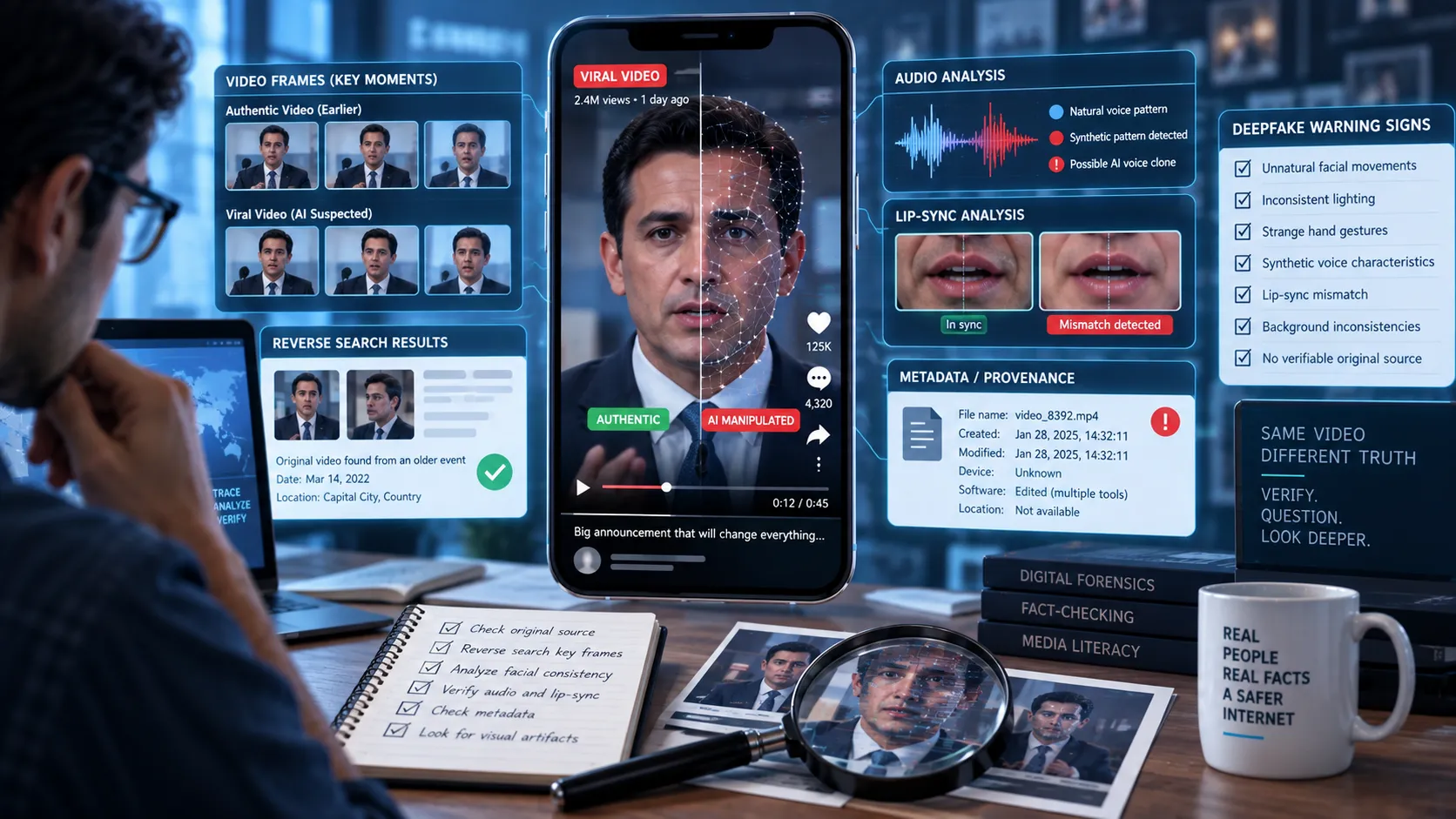
This can be particularly useful when someone takes authentic footage and uses AI to modify it.
For example:
Original: A real interview with a politician.
Manipulated: The person's face and voice are altered to make them appear to say something they never said.
Finding the original interview can reveal the manipulation.
15. Search for the Original Source
Finding the original source is often more useful than simply asking whether AI was used.
Try to determine:
- Who created the footage?
- When was it recorded?
- Where was it recorded?
- What did the original version show?
- Has the footage been edited?
- Does the current version match the original?
If you find an earlier, trustworthy version, compare the two.
Differences may reveal whether the viral version has been altered.
16. Don't Trust AI Detection Tools Blindly
AI detection tools can be useful, but they aren't perfect.
A detector might incorrectly classify:
- Real footage as AI-generated
- AI-generated footage as authentic
- Heavily compressed footage as synthetic
- Edited footage as fully AI-generated
The technology is also changing rapidly.
Therefore, an AI detector's result should be treated as one piece of evidence, not the final verdict.
A stronger investigation combines:
- Visual analysis
- Audio analysis
- Source tracing
- Reverse searches
- Metadata when available
- Account history
- Independent reporting
- Original-source comparison
17. Check Whether the Platform Labels AI Content
Some platforms and creators may provide labels or disclosures for AI-generated or manipulated content.
If a video includes an AI-generated-content disclosure, take it seriously.
But the absence of a label does not necessarily mean the video is authentic.
Platform policies and labeling systems vary, and not every AI-generated video will be correctly labeled.
AI Video Verification Checklist
Before sharing a suspicious video, run through this checklist:
- Does the face remain consistent across frames?
- Do eyes and facial expressions look natural?
- Are hands and fingers consistent?
- Does text remain stable?
- Do objects maintain their shape?
- Does movement follow realistic physics?
- Do lighting and shadows make sense?
- Do reflections match the environment?
- Does the voice sound natural?
- Does the audio match the person's mouth movements?
- Who originally uploaded the video?
- Is there an older version?
- Can the claimed event be independently verified?
- Does the uploader disclose AI use?
- Does reliable evidence support the video's context?
The more warning signs you find, the more carefully you should investigate.
AI-Generated vs. AI-Manipulated Videos
It's useful to distinguish between two broad categories.
AI-Generated
The video or major parts of the video are created synthetically.
Examples include:
- A completely fictional person
- A generated news scene
- A synthetic landscape
- An AI-generated advertisement
AI-Manipulated
Real footage is altered using AI.
Examples include:
- Face swaps
- Voice cloning
- Lip-sync manipulation
- Removing or adding people
- Changing objects
- Altering what someone appears to say
AI manipulation can be especially dangerous because the underlying footage may be authentic.
A real-looking video doesn't necessarily mean the events shown or words spoken are genuine.
The Biggest Mistake: Looking for One "AI Glitch"
One of the biggest mistakes people make when trying to identify AI videos is looking for a single obvious error.
There may not be one.
Instead, investigate the video as a whole.
Think about three levels of evidence:
Level 1: Visual Evidence
What looks strange?
Level 2: Source Evidence
Where did the video come from?
Level 3: Contextual Evidence
Does the claim surrounding the video match independently verifiable information?
When all three point in the same direction, your conclusion becomes much stronger.
How Somiq Can Help With Suspicious Videos
When you encounter a suspicious video on TikTok, Instagram, YouTube, or another platform, don't stop at asking whether it "looks AI-generated."
A better verification process is to investigate the claim, source, context, and supporting evidence.
Somiq is built to help users evaluate claims made in short-form videos and identify information that deserves closer verification.
Instead of relying on intuition, use evidence.
If a video claims that a public figure said something, investigate the original statement.
If it claims that an event happened recently, verify the date and location.
If it shows an apparently impossible scene, investigate where the footage came from.
And if the video appears AI-generated, look for independent evidence before deciding what to believe.
Final Takeaway
AI-generated videos are becoming increasingly difficult to distinguish from authentic footage.
There is no single foolproof visual trick that works every time.
Instead, look for multiple clues:
- Facial inconsistencies
- Strange hands
- Unnatural motion
- Changing text
- Inconsistent lighting
- Unusual reflections
- Synthetic voices
- Poor lip-syncing
- Contextual inconsistencies
- Missing or questionable sources
Most importantly, don't rely solely on what your eyes tell you.
Trace the source. Check the context. Compare versions. Look for independent evidence.
A convincing video isn't automatically a trustworthy video.
When something looks shocking, unbelievable, or perfectly designed to trigger an emotional reaction, that's exactly when it's worth slowing down and verifying before you share it.