How to Verify a Video You See on Instagram
Seen a surprising claim in an Instagram Reel? Learn how to verify a video, check its original source, identify edited or misleading footage, and fact-check claims before you believe or share them.
How to Verify a Video You See on Instagram
Instagram is full of videos that look convincing at first glance. A Reel may show a dramatic event, make a surprising claim, or appear to provide evidence for something you already believe.
But a video looking real does not necessarily mean the claim attached to it is true.
Old footage can be presented as a recent event. A real video can be paired with a completely false caption. Clips can be edited to remove important context. AI-generated or manipulated media can also make it harder to tell what actually happened.
The good news is that you do not need to be an expert investigator to verify most suspicious videos.
This guide explains a simple process you can follow whenever you see a video on Instagram that you are unsure about.
Why You Should Verify Instagram Videos
Short-form videos are designed to capture attention quickly. They often provide only a few seconds of information, leaving out the background needed to understand what actually happened.
A video can therefore be authentic while the story surrounding it is false.
For example:
- A video from 2022 may be shared as if it happened today.
- Footage from one country may be falsely claimed to show another country.
- A genuine video may be cropped to hide what happened before or after the recorded moment.
- A satirical video may be presented as a real news report.
- A real event may be described with a completely false explanation.
- A manipulated or AI-generated video may appear authentic at first glance.
This is why verifying the claim is just as important as determining whether the video itself is real.
Step 1: Stop Before You Share the Video
The first step is simple: do not immediately share a video because it looks convincing.
Pay attention to your initial reaction.
If a Reel makes you feel shocked, angry, scared, or extremely excited, take a moment before accepting its claim. Strong emotional reactions can make misinformation more persuasive.
Ask yourself:
What exactly is this video claiming?
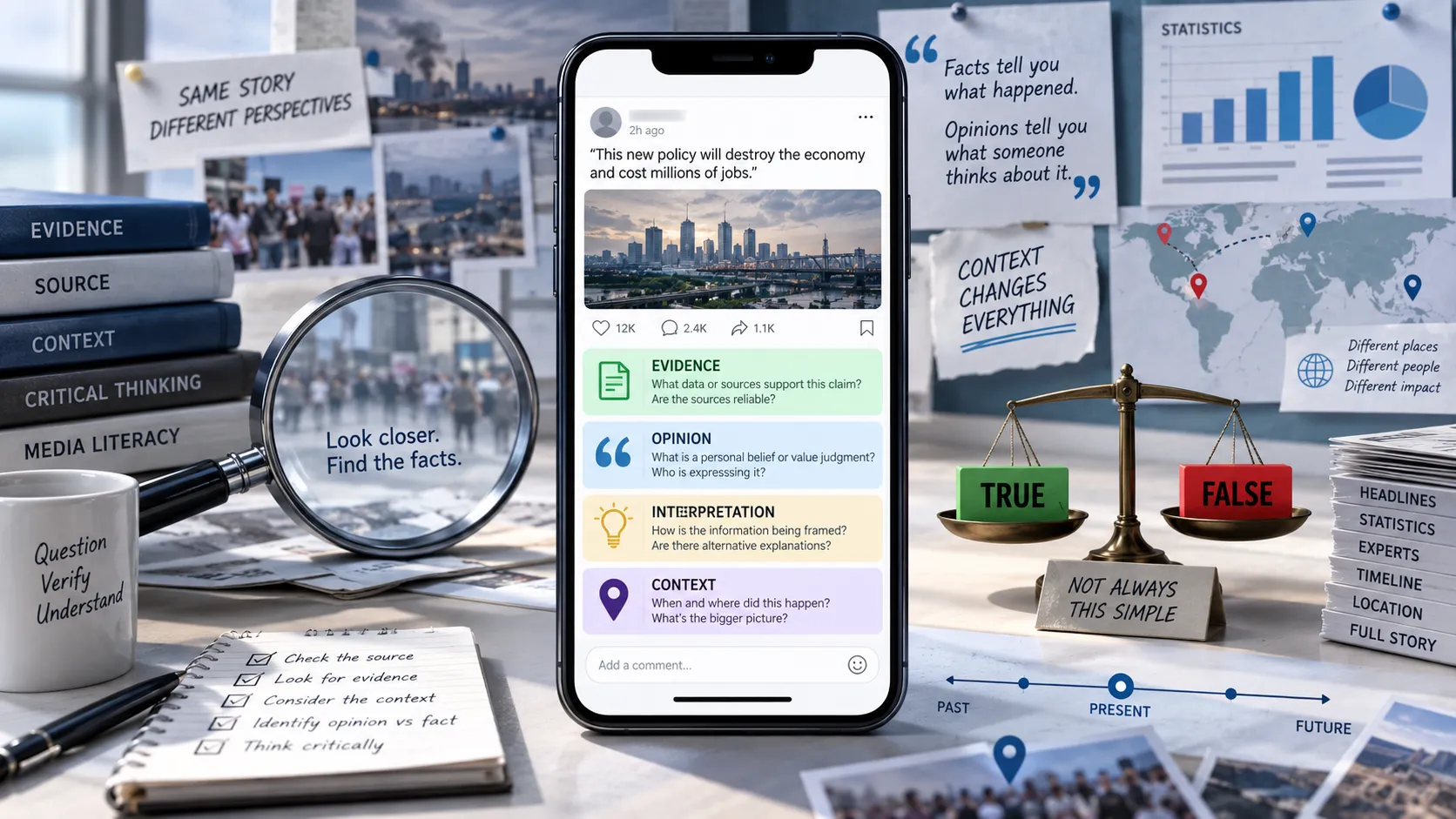
Try to separate what you can actually see from what the caption, creator, or comments are telling you.
For example, you might see a video showing a large crowd.
The video itself proves that a crowd was present.
It does not automatically prove:
- where the crowd was,
- when the video was recorded,
- why the crowd gathered,
- how many people were there,
- or whether the accompanying explanation is accurate.
That distinction is extremely important when fact-checking videos.
Step 2: Identify the Exact Claim
Before searching for information, write down the specific claim you want to verify.
Instead of asking:
"Is this Reel fake?"
ask a more precise question such as:
"Does this video actually show a protest in Delhi in September 2026?"
or:
"Did this person really make the statement shown in the video?"
or:
"Did this event actually happen on the date mentioned in the Reel?"
Breaking a viral video into specific claims makes verification much easier.
A single Reel can contain several claims, and some may be true while others are false.
Step 3: Check Who Posted the Video
Look at the Instagram account that uploaded the Reel.
Consider:
- Who runs the account?
- Is it an individual, news organization, brand, government agency, or parody account?
- Does the account regularly post similar content?
- Does it provide sources?
- Does the account have a history of correcting mistakes?
- Is the account pretending to represent another organization?
Do not assume that a large follower count means an account is reliable.
Likewise, a small account is not automatically unreliable.
The purpose of checking the account is to understand the source and find out whether there is additional context behind the video.
Step 4: Read the Caption Carefully
The caption can contain important information that is missing from the video.
Look for:
- dates,
- locations,
- names,
- event descriptions,
- links,
- quoted statements,
- references to news organizations,
- and claims about what the footage supposedly shows.
Pay particular attention to words such as:
- "today"
- "breaking"
- "just happened"
- "confirmed"
- "never before seen"
- "shocking"
- "this is proof"
These phrases can create urgency without providing evidence.
Also check whether the caption actually identifies the original source of the footage.
Step 5: Look for the Original Video
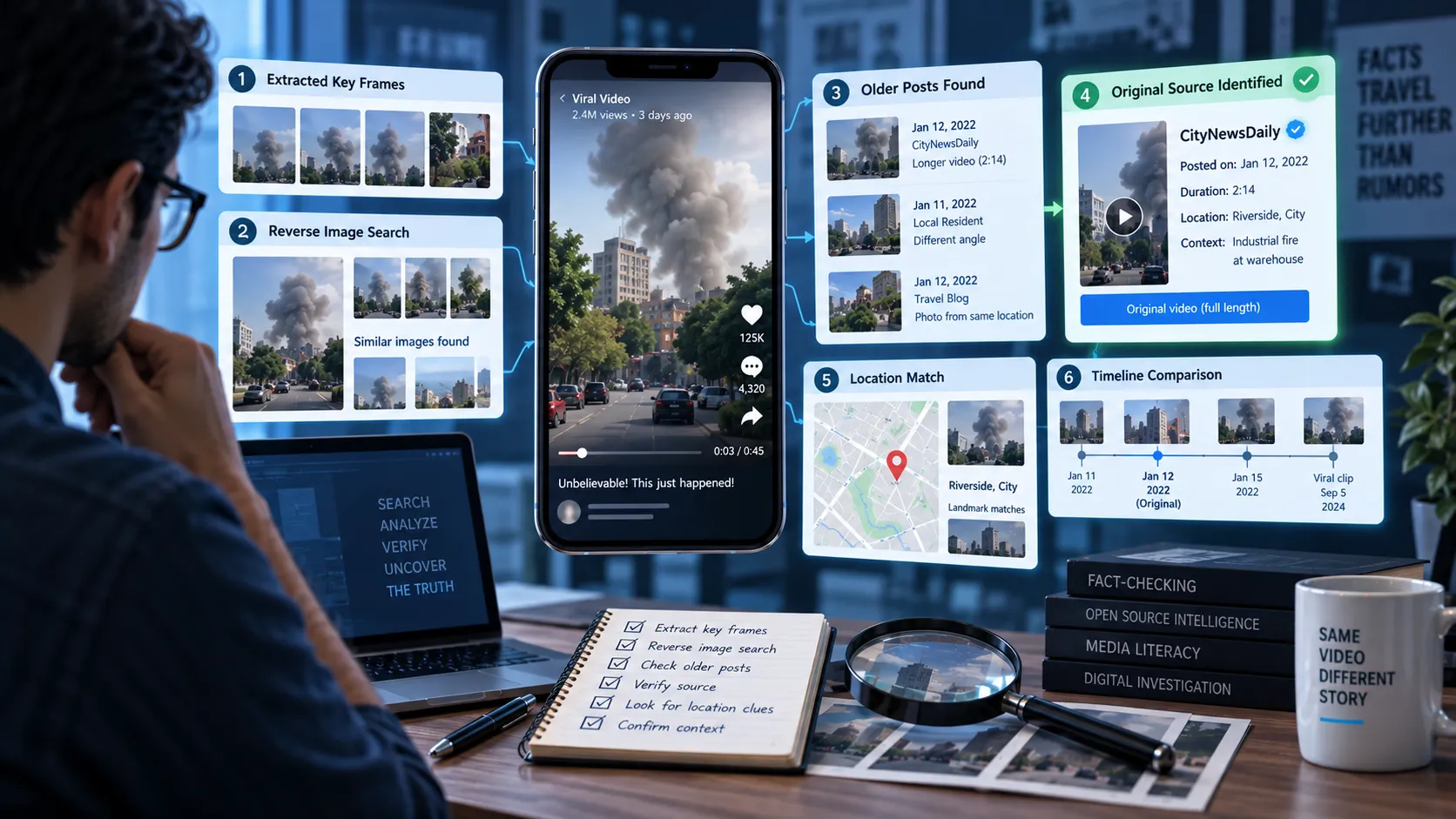
One of the most useful ways to verify an Instagram video is to find where it originally came from.
A Reel may be a repost of footage that has existed online for months or years.
Try searching for distinctive information from the video, including:
- a person's name,
- location,
- event name,
- unusual phrase,
- date,
- organization,
- or words spoken in the video.
You can also take screenshots of distinctive frames and use reverse-image-search tools to look for earlier appearances of the footage.
Finding the earliest reliable version can reveal whether the Instagram post has changed the context.
Step 6: Check the Date
One of the most common forms of misinformation involving videos is old footage presented as new.
A genuine video can therefore be used to support a false claim.
Suppose an Instagram Reel says:
"This happened today."
But the same footage appeared online several years ago.
The footage may be completely authentic, while the Instagram claim is misleading.
When checking a video, always ask:
When was this footage actually recorded?
Do not confuse:
- the date the Reel was posted,
- the date the video was recorded,
- and the date of the event being discussed.
These can all be different.
Step 7: Verify the Location
A video may be real but shown as being from the wrong location.
Look for visual clues such as:
- road signs,
- storefronts,
- buildings,
- landmarks,
- language,
- vehicle license plates,
- public transportation,
- weather conditions,
- landscape,
- and distinctive architecture.
Then compare those clues with reliable information about the claimed location.
For example, if a Reel claims that a video was recorded in Mumbai, but visible signs or landmarks point somewhere else, that is an important warning sign.
Step 8: Check for Editing and Missing Context
Videos on Instagram are frequently shortened or edited.
Editing alone does not make a video false. The important question is whether the editing changes the meaning.
Watch for:
- abrupt cuts,
- missing sections,
- cropped footage,
- unusual transitions,
- audio that does not match the video,
- repeated frames,
- captions that contradict what is being shown,
- or clips combined from different events.
If someone appears to say something shocking, try to find the complete interview or original recording.
A short clip may make a statement appear to mean something completely different from what the person actually said.
Step 9: Search for Independent Sources
Do not rely only on the Instagram post itself.
Search for independent reporting about the event or claim.
Useful sources can include:
- established news organizations,
- government agencies,
- official institutions,
- original documents,
- scientific organizations,
- eyewitness accounts with verifiable evidence,
- and professional fact-checking organizations.
Ideally, look for multiple independent sources rather than relying on one article.
For major events, you can compare what several credible sources are reporting.
If an extraordinary claim appears only on one Instagram account while reliable sources provide no supporting evidence, that is a reason to be cautious.
Step 10: Check Whether the Video Has Been Fact-Checked
Some viral videos have already been investigated by professional fact-checkers.
Search the distinctive claim or wording from the Reel along with terms such as:
- "fact check"
- "false"
- "misleading"
- "old video"
- "AI-generated"
- "out of context"
Professional fact-checking organizations may have already identified the original footage, explained the missing context, or documented how the claim spread.
However, remember that a fact-check should itself be evaluated. Check who published it, what evidence they provide, and whether their conclusion is supported by primary sources.
Step 11: Be Careful With AI-Generated and Manipulated Videos
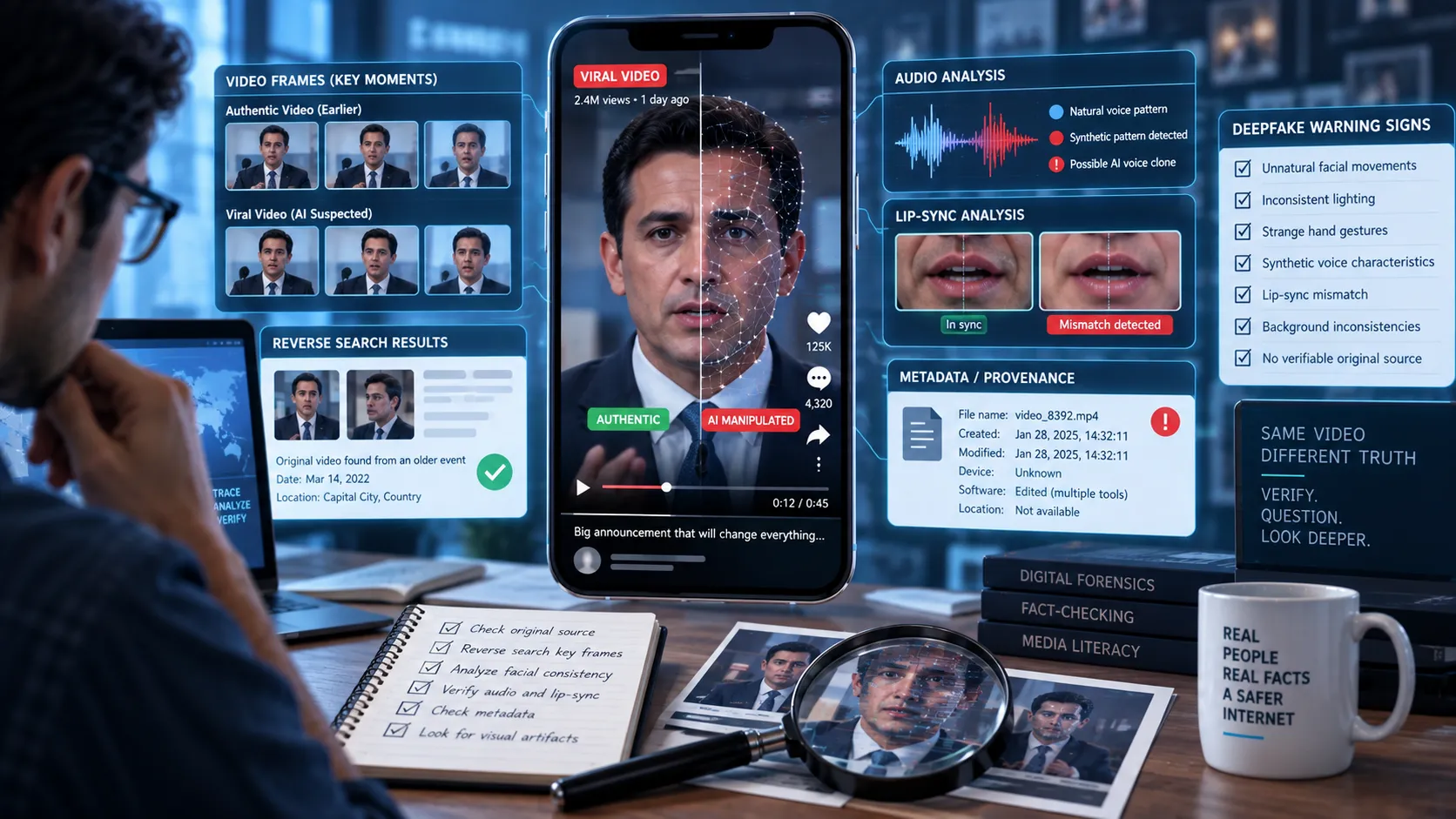
Advances in generative AI have made manipulated videos increasingly convincing.
Some videos may involve:
- face swaps,
- synthetic voices,
- lip-sync manipulation,
- AI-generated scenes,
- digitally altered backgrounds,
- or combinations of real and generated footage.
Visual imperfections can sometimes provide clues, but they should not be your only method of verification.
Things like strange hands, unnatural facial movements, inconsistent lighting, or distorted text can be useful warning signs, but modern AI-generated media can sometimes avoid obvious visual errors.
Instead of asking only:
"Does this look AI-generated?"
also ask:
"Where did this video come from, and can its claims be independently verified?"
Provenance and corroborating evidence are often more useful than trying to identify AI artifacts by appearance alone.
Step 12: Check the Comments, But Don't Treat Them as Proof
Instagram comments can sometimes provide useful clues.
Someone may point out that:
- the footage is old,
- the location is wrong,
- the original video exists elsewhere,
- or the claim has already been debunked.
But comments are not automatically reliable evidence.
A comment saying "this is fake" does not prove that the video is fake.
Use comments as leads for further investigation, not as your final source of truth.
Step 13: Compare the Claim With the Evidence
Once you have gathered information, compare the original claim with what the evidence actually supports.
A useful approach is to classify the result into categories such as:
True
The available evidence supports the claim.
False
Reliable evidence contradicts the claim.
Misleading
The video or underlying event may be real, but the way it is presented creates a false or inaccurate impression.
Out of Context
The footage is authentic but is being used to describe a different event, location, date, or situation.
Unverified
There is not enough reliable evidence to determine whether the claim is true.
This is an important distinction.
Not finding evidence that a claim is true does not automatically prove that it is false.
A Quick Instagram Video Verification Checklist
Before sharing a suspicious Reel, ask:
- Who posted it?
- What exactly is being claimed?
- When was the footage recorded?
- Where was it recorded?
- Can I find the original video?
- Has the video been edited or cropped?
- Is important context missing?
- Do independent sources confirm the claim?
- Has a credible fact-checker investigated it?
- Could the video be manipulated or AI-generated?
- Am I relying on comments instead of evidence?
If several answers raise questions, pause before sharing.
How Somiq Can Help You Verify a Video
Manually checking a viral video can take time, especially when the Reel contains several claims or when the original source is difficult to find.
Somiq is designed to help with this process.
Instead of simply asking whether a video "looks fake," Somiq focuses on the factual claims made in short-form videos and helps you investigate whether those claims are supported by available evidence.
For example, a video might claim:
"This new law was announced yesterday."
A useful verification process would not stop at analyzing the video's appearance. It would identify the claim, investigate relevant sources, compare the available evidence, and explain what the evidence actually supports.
That distinction matters because misinformation is not always a fake video.
Sometimes the video is completely real.
The claim attached to it is the problem.
Don't Confuse "Real Video" With "True Story"
This is perhaps the most important rule when verifying social media videos.
A video can be:
Real footage + false caption = misleading information
Real footage + wrong date = misleading information
Real footage + wrong location = misleading information
Real footage + missing context = misleading information
AI-generated footage + false claim = misinformation
Therefore, verifying a video means investigating both the media and the claims surrounding it.
Final Takeaway
You do not have to become a professional fact-checker to avoid being misled by Instagram videos.
Start by slowing down.
Identify the exact claim. Check the account and caption. Find the original footage if possible. Verify the date and location. Look for editing and missing context. Compare the claim with independent sources, and check whether credible fact-checkers have already investigated it.
Most importantly, remember that a video being real does not automatically make the story attached to it true.
When something looks shocking, surprising, or too good to be true, take a few minutes to verify it before you believe it or pass it on.