How to Verify a YouTube Short Before Believing It
YouTube Shorts can spread false or misleading claims in seconds. Learn how to verify a Short by checking its source, original context, dates, evidence, experts, and other reliable sources before accepting or sharing what it says.
How to Verify a YouTube Short Before Believing It
YouTube Shorts are designed to be quick, engaging, and easy to share. That also makes them an effective way for false or misleading information to spread.
A Short may show a dramatic clip, make a surprising claim, cite a statistic, or confidently explain a complicated topic in less than a minute. But confidence, views, likes, and comments are not proof that something is true.
Before believing or sharing a claim from a YouTube Short, it is worth taking a few minutes to verify it.
This guide explains a simple process you can use to check whether a YouTube Short is accurate, misleading, taken out of context, or completely false.
Why You Should Verify YouTube Shorts
Short-form videos compress a lot of information into a very small amount of time. Creators may leave out important context simply because they have limited time to explain a subject.
A Short can also combine real footage with a false explanation.
For example, a video might show genuine footage of an earthquake and claim that it happened in a particular country yesterday. The footage may be real, but the claim about when and where it happened could be completely wrong.
Other Shorts may:
- Use old footage as if it were recent
- Show a real event but provide a false explanation
- Quote statistics without mentioning their source
- Present opinions as established facts
- Use edited clips to change the meaning of what someone said
- Use AI-generated or manipulated images and audio
- Remove important context from a longer video
- Attribute statements to people who never made them
The goal of verification is not to assume every Short is false. It is to determine whether the specific claim being made is supported by reliable evidence.
Step 1: Identify the Exact Claim
The first step is to separate the actual claim from the video's presentation.
Ask yourself:
What exactly is this video asking me to believe?
For example, a Short might say:
"Scientists have discovered that drinking coffee before exercise doubles fat burning."
The important thing to verify is not whether the video looks professional. The claim is that scientists discovered a specific effect and that coffee doubles fat burning.
Write the claim down mentally or in your notes.
If a video contains several claims, break them into separate statements and verify each one independently.
Look for Specific Details
Pay attention to:
- Who supposedly made the claim
- What happened
- Where it happened
- When it happened
- How large or significant the effect supposedly was
- What evidence the creator provides
The more specific a claim is, the easier it usually is to investigate.
Step 2: Check Who Published the Short
Look at the YouTube channel that published the video.
Consider:
- Who runs the channel?
- What is the channel usually about?
- Does it provide sources?
- Does it have a history of correcting mistakes?
- Is the creator presenting expertise they actually have?
- Is the video designed primarily to entertain, persuade, or inform?
A creator does not need to be an expert for everything they say to be false, and an expert can make mistakes.
The purpose of checking the creator is to understand the source and decide how much weight to give the claim.
Be Careful With Authority Signals
Large subscriber counts, verified badges, professional editing, expensive cameras, and confident narration can make a video appear trustworthy.
None of these things prove that a factual claim is correct.
Always evaluate the evidence behind the claim.
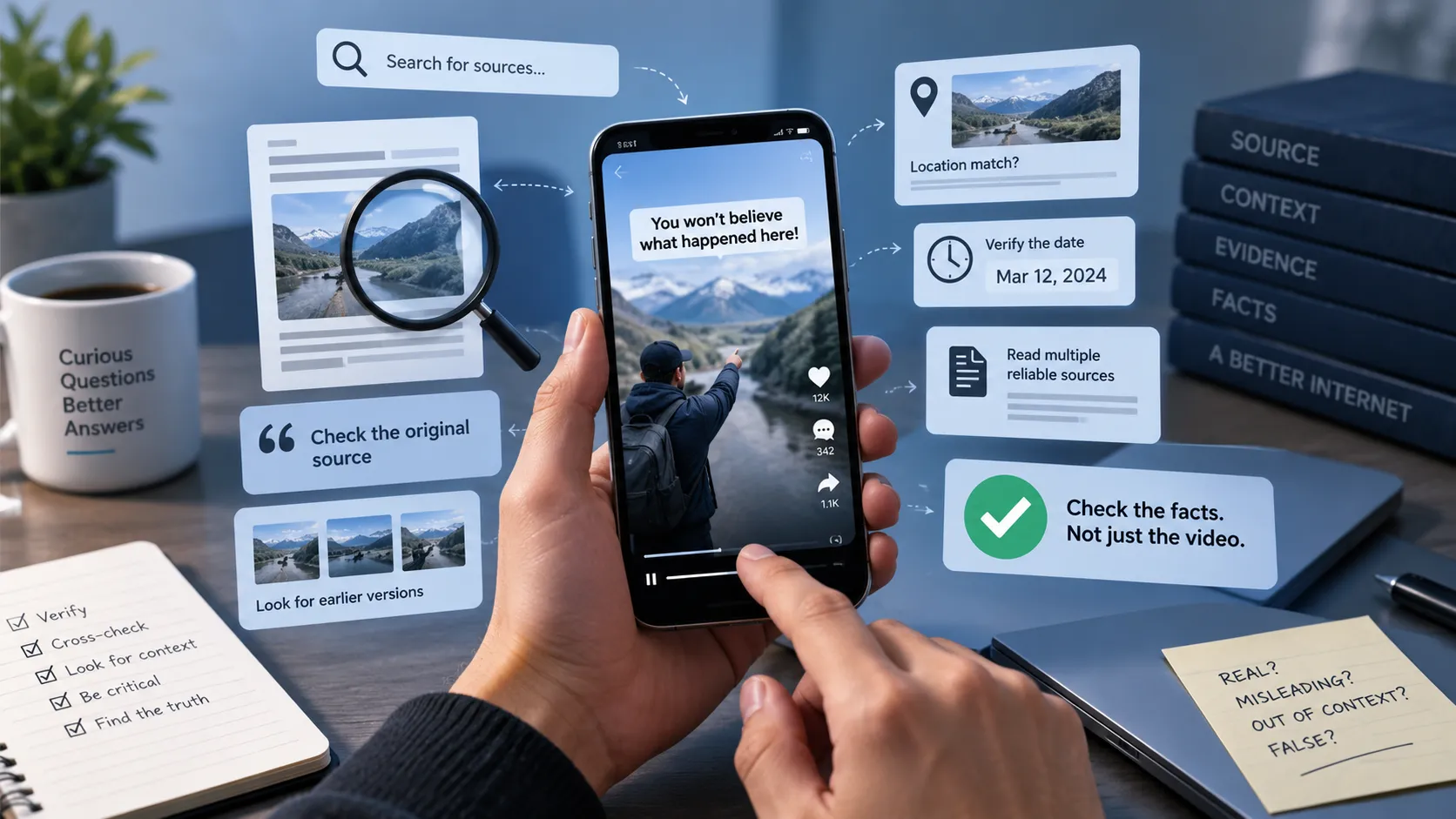
Step 3: Find the Original Source
One of the most useful verification techniques is to find where the information originally came from.
If a Short says:
"A new study proves..."
Look for the study.
If it says:
"According to NASA..."
Find the original NASA material.
If it quotes a politician, scientist, celebrity, or public official, look for the complete interview, speech, statement, or transcript.
The original source may reveal that the Short:
- Misquoted someone
- Removed important context
- Used an outdated source
- Misinterpreted a study
- Changed a statistic
- Used a headline instead of the underlying evidence
Whenever possible, verify information at the source rather than relying on someone else's interpretation of it.
Step 4: Check the Date
Dates are one of the most commonly overlooked parts of online verification.
A video can contain genuine footage and still be misleading because the footage is old.
For example, a Short may claim that:
"This is what the city looks like after today's storm."
But a reverse image search or search for the original video may reveal that the footage was recorded years earlier.
Check:
- When was the Short uploaded?
- When did the event supposedly happen?
- When was the original photo or video created?
- When was the cited study published?
- Is the information still current?
An old fact can also become misleading when presented as new information.
Step 5: Search for Independent Sources
Do not rely on another social media post repeating the same claim.
Look for independent sources that have their own evidence.
Depending on the subject, useful sources may include:
- Government agencies
- Universities
- Scientific journals
- Official organizations
- Reputable news organizations
- Original research papers
- Public records
- Expert organizations
Try searching for the exact claim using important keywords.
For example:
"coffee doubles fat burning study"
Then compare what multiple reliable sources say.
Look for Agreement and Disagreement
If several independent, credible sources reach the same conclusion, that provides stronger evidence.
If reputable sources disagree, do not automatically choose the result you prefer.
Instead, investigate why they disagree and whether newer evidence is available.
Step 6: Check the Evidence Shown in the Video
A YouTube Short may display charts, screenshots, headlines, scientific papers, or documents to make its argument look convincing.
Pause the video and examine them.
Ask:
Can I find this source myself?
A screenshot of a newspaper headline does not prove the entire claim.
A chart without a source cannot easily be evaluated.
A screenshot of a scientific paper may be selectively showing one sentence while ignoring the study's limitations.
Look for:
- The name of the source
- Publication date
- Author
- Study title
- Data
- Methodology
- Context
- Links to the original material
The more important the claim, the more important it is to inspect the underlying evidence.
Step 7: Watch for Missing Context
Sometimes a statement is technically true but presented in a misleading way.
Imagine a Short saying:
"Scientists say this food causes cancer."
That sounds definitive.
But the underlying research might have found an association in a small observational study, rather than proving that the food directly causes cancer.
This is why context matters.
Ask:
- What information was left out?
- Was the study conducted on humans or animals?
- How large was the study?
- Was it observational or experimental?
- Was the result statistically significant?
- Were there important limitations?
- Does the source actually support the creator's conclusion?
A claim can become misleading without containing a completely fabricated fact.
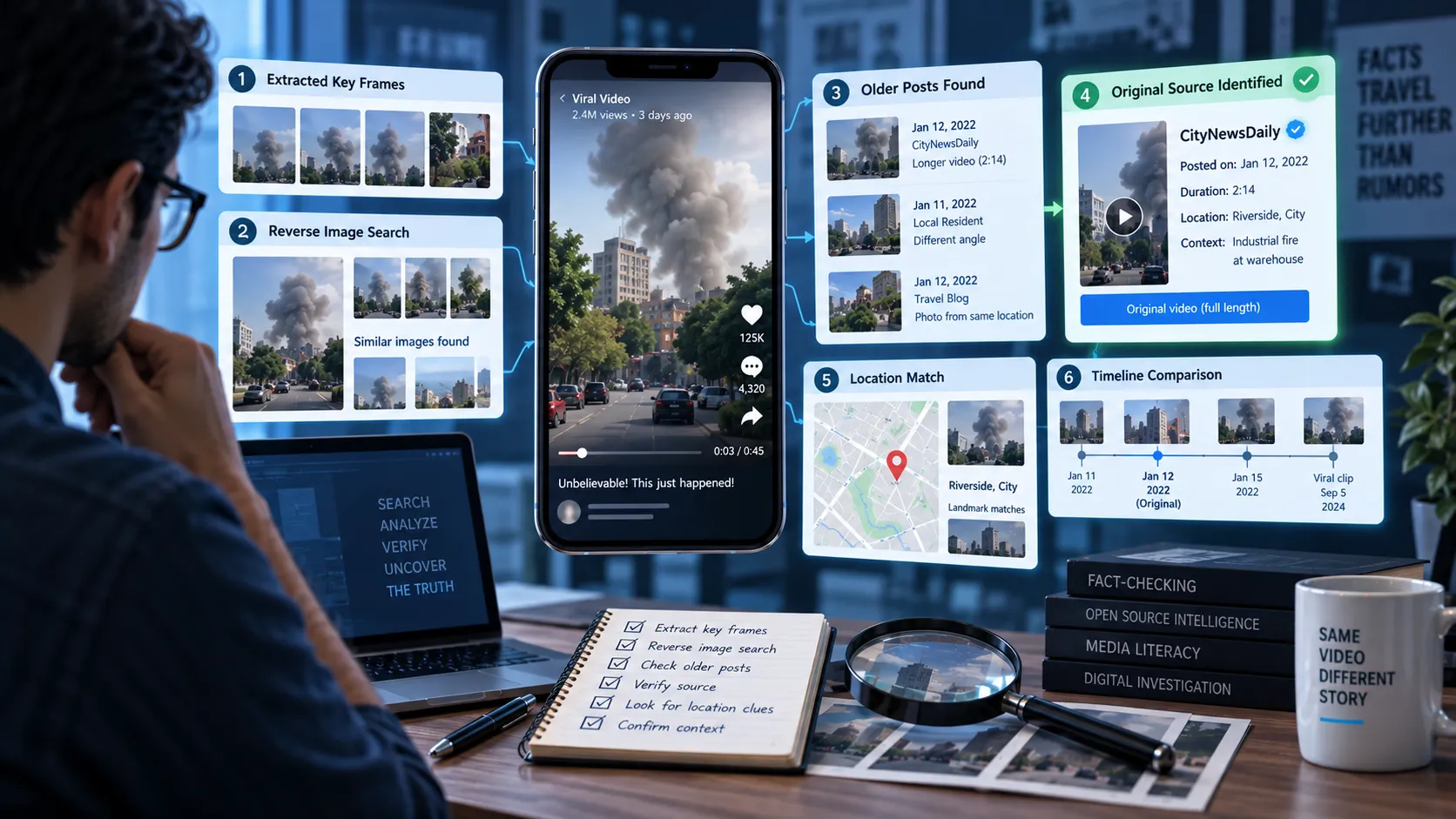
Step 8: Check Images and Video Clips
Visual evidence can be persuasive, but images and videos can also be reused or manipulated.
If a Short shows a surprising image or clip, investigate it separately.
You can look for:
- Earlier versions of the clip
- The original uploader
- The original date
- The original location
- Longer versions of the footage
- Different angles of the same event
- Signs that the video has been edited
Pay particular attention when a video contains dramatic footage but provides little information about where or when it was recorded.
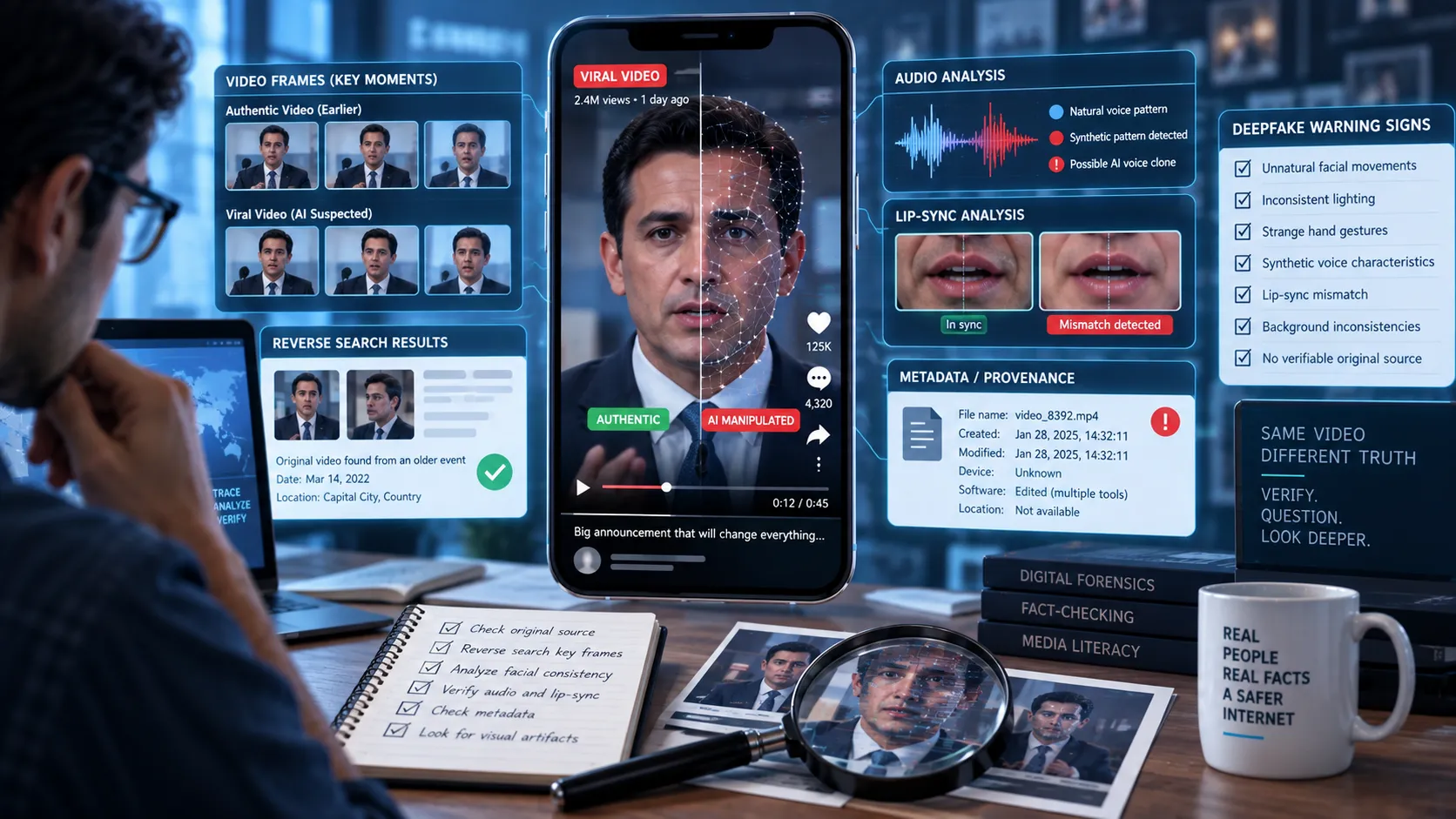
Step 9: Watch for AI-Generated or Manipulated Content
AI tools have made it easier to create convincing images, voices, and videos.
A Short may contain:
- AI-generated people
- Synthetic voices
- Altered faces
- Fabricated screenshots
- Artificial scenes
- Edited or cloned audio
Do not rely on visual appearance alone.
Instead, verify the underlying claim using independent sources.
A useful rule is:
If the claim is important, verify the information behind the media rather than trying to determine whether the media "looks real."
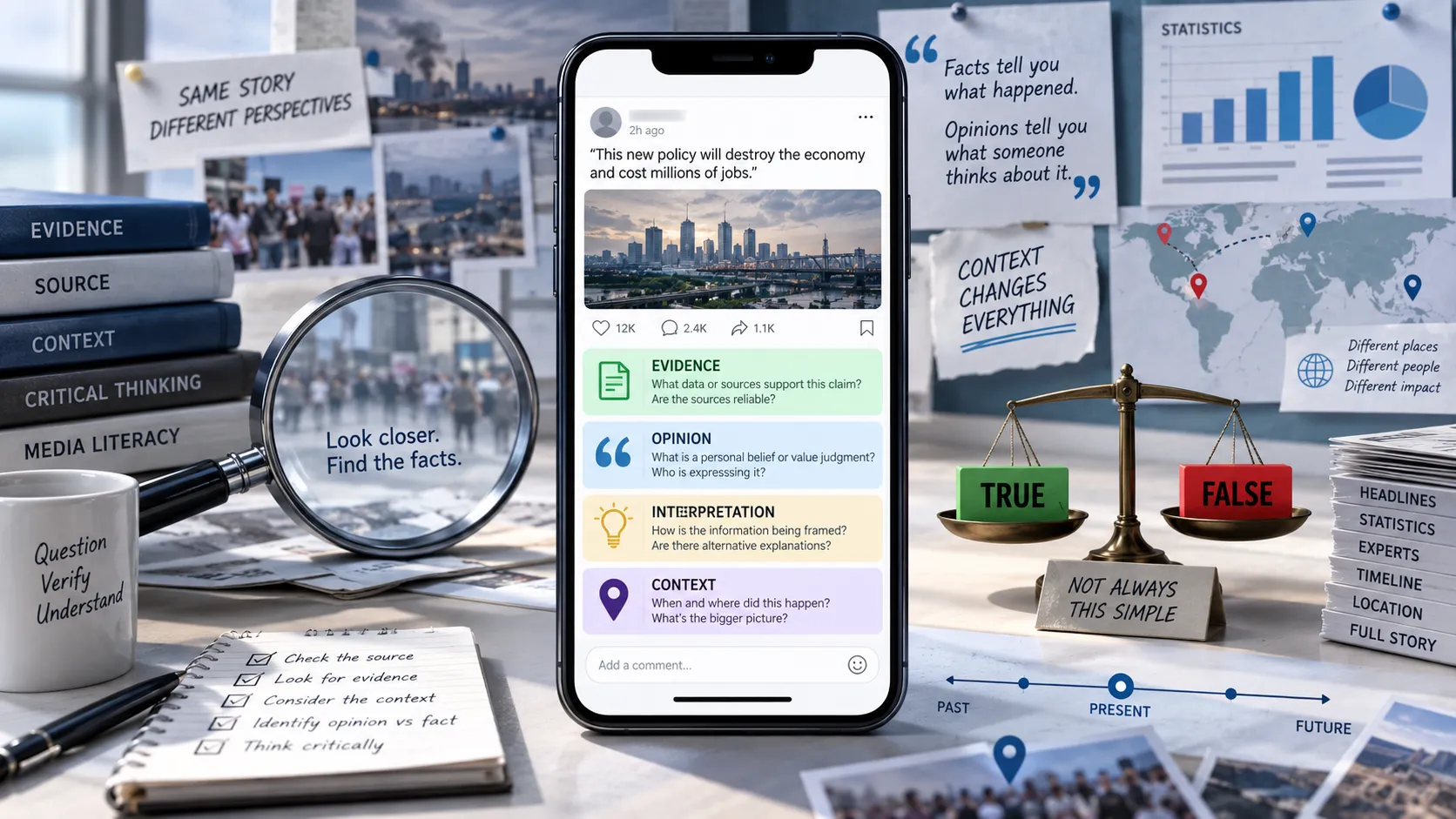
Step 10: Separate Facts From Opinions
Not everything in a Short is a factual claim.
Creators may mix facts, predictions, interpretations, and opinions in the same video.
For example:
Fact: "The company reported a 20% increase in revenue."
Interpretation: "This shows the company is becoming unstoppable."
Prediction: "Its stock will double next year."
The first statement may be verifiable using company filings or financial reports.
The second is an interpretation.
The third is a prediction.
Treat each type differently.
Step 11: Check Whether the Headline Matches the Evidence
Some Shorts use sensational claims because they attract attention.
A creator may say:
"Scientists just discovered a miracle cure!"
But the underlying research might only show an early laboratory result.
Look for exaggeration such as:
- "Scientists are shocked"
- "They don't want you to know"
- "This changes everything"
- "100% proof"
- "The media won't tell you"
- "Experts are hiding this"
- "Guaranteed"
- "Everyone is wrong"
These phrases do not automatically mean the claim is false.
They are simply reasons to slow down and investigate the evidence more carefully.
Step 12: Use Fact-Checking Tools When Necessary
If a claim is difficult to verify yourself, use reliable fact-checking resources and verification tools.
For particularly important claims, compare the claim against multiple sources rather than relying on a single fact-check.
Somiq can also help you investigate factual claims in short-form videos by breaking down what is being claimed and helping you evaluate the evidence behind it.
A Quick YouTube Short Verification Checklist
Before believing or sharing a Short, ask:
1. What is the exact claim?
Can I clearly state what the video is asking me to believe?
2. Who is making the claim?
Do I know who created the video and what their source is?
3. What is the original source?
Can I find the study, document, interview, report, or official statement?
4. Is the information current?
Could the footage, statistic, or claim be old?
5. Do independent sources confirm it?
Are reputable sources reporting the same thing?
6. Is anything missing?
Could the Short be leaving out important context?
7. Is the visual evidence authentic?
Can I find the original photo or video?
8. Is this a fact or an opinion?
Is the creator presenting an interpretation or prediction as a fact?
9. Does the evidence actually support the conclusion?
Is the creator making a bigger claim than the source supports?
10. Would I still believe this if the video had fewer views?
Am I trusting popularity instead of evidence?
A Simple 60-Second Verification Method
You do not always need to conduct a full investigation.
For everyday claims, use this quick process:
Pause → Identify → Search → Compare → Verify
Pause: Don't immediately like, share, or believe the video.
Identify: Determine the exact factual claim.
Search: Search the key claim and look for the original source.
Compare: Check what multiple credible sources say.
Verify: Decide whether the evidence supports the claim, contradicts it, or leaves the question uncertain.
If you cannot verify an important claim, it is perfectly reasonable to say:
"I don't know yet."
Not every claim needs an immediate yes-or-no answer.
What If You Cannot Find Any Evidence?
A lack of easily searchable evidence does not automatically prove that a claim is false.
It means you have not established that the claim is true.
This distinction is important.
There are three useful conclusions you may reach:
Verified: Reliable evidence supports the claim.
False or misleading: Reliable evidence contradicts the claim or shows that important context has been omitted.
Unverified: There is not enough reliable evidence to confidently determine whether the claim is true.
"Unverified" is often the most honest answer when the available evidence is incomplete.
Don't Judge a Short by Its Views
Millions of views do not make a claim true.
Thousands of comments do not make it true either.
A viral video can spread because it is surprising, emotional, funny, controversial, or easy to understand.
Those qualities can increase engagement without increasing accuracy.
The best question is not:
"How many people believe this?"
It is:
"What evidence supports this?"
Final Takeaway
YouTube Shorts are a powerful way to discover information, but their short format can make complicated claims appear simpler and more certain than they really are.
Before believing a surprising claim, take a moment to identify exactly what is being said, find the original source, check the date, look for independent evidence, inspect the context, and distinguish facts from opinions.
You do not need to become a professional fact-checker to avoid misinformation.
You just need to develop the habit of pausing before believing and checking before sharing.
See a claim in a YouTube Short that you're unsure about? Use Somiq to investigate it before you believe or share it.